MEPCO Bill Online Check July 2026 — View & Download Duplicate Bill
Enter your 14-digit reference number or 10-digit customer ID below to see your current MEPCO electricity bill, amount due, and last 12 months of payment history. No registration needed — free and instant.
MEPCO Online Bill Check
Enter your Reference Number or Consumer ID to open the latest official PITC bill.
How to Check Your MEPCO Bill Online in 3 Steps
- Step 1 — Find Your Number Look at any old MEPCO bill. Your 14-digit Reference Number is printed at the top-left, labelled “REFERENCE NO.” Your 10-digit Consumer ID is printed just above it. Either one works.
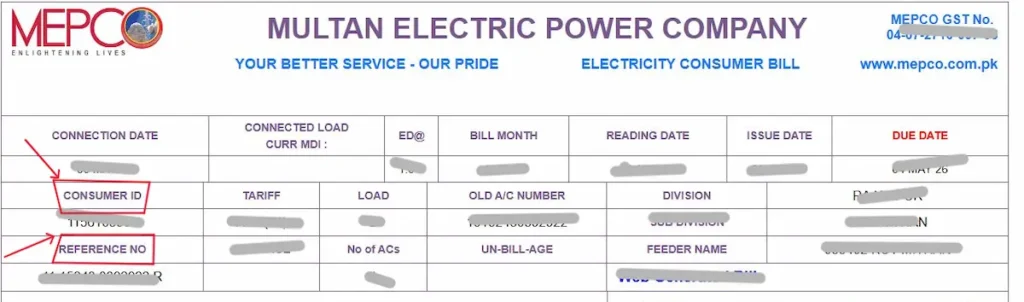
- Step 2 — Enter & Hit Check Bill Type your number in the field above — no spaces, no dashes. Select the correct type (Reference No or Consumer ID), then tap Check Bill. Result loads in seconds directly from PITC’s live database.

- Step 3 — View, Pay or Download Your bill shows the current amount due, due date, after-due-date amount, and last 12 months of payment history. Hit Ctrl+P or tap Print to save it as a PDF — accepted at any bank, Easypaisa, or JazzCash counter.
What Does Your MEPCO Online Bill Show?
The online bill contains the same information as your paper bill — nothing is missing or withheld:
- Current payable amount — the exact amount owed if paid on or before the due date
- After-due-date amount — the same figure plus the late payment surcharge, a fixed percentage added once the due date passes
- Meter reading date — the date MEPCO’s reader physically visited your premises that month
- Bill issue date — the date your bill was generated and sent out
- Units consumed — total kilowatt-hours (kWh) used since the previous reading
- 12-month payment history — status of each of your last 12 bills: paid on time, paid late, or still outstanding
- Bill status — whether the current month’s bill is paid or unpaid
What is MEPCO? (Multan Electric Power Company)
MEPCO — Multan Electric Power Company — is a public limited company incorporated on 14 May 1998. It is Pakistan’s largest electricity distribution company (DISCO), responsible for supplying bijli to 13 administrative districts of South Punjab. MEPCO operates through 9 regional circles — Multan, Sahiwal, Bahawalpur, Khanewal, Rahim Yar Khan, DG Khan, Muzaffargarh, Vehari, and Bahawalnagar — serving domestic, commercial, agricultural, and industrial consumers. It operates under the Ministry of Energy (Power Division) and is regulated by NEPRA. Your bill data is maintained and served by PITC (Power Information Technology Company).
Is MEPCO the Same as WAPDA?
No. MEPCO was carved out of WAPDA in the 1998 unbundling of Pakistan’s power sector. Today MEPCO operates under the Ministry of Energy (Power Division) and is regulated by NEPRA, while WAPDA handles hydel generation and water resources only. When someone searches “WAPDA MEPCO bill,” they mean their MEPCO electricity bill. Your meter, your bill, and your helpline all belong to MEPCO directly.
MEPCO Districts — All 13 Areas Served
| District | District |
|---|---|
| Multan | Bahawalpur |
| Rahim Yar Khan | Dera Ghazi Khan |
| Sahiwal | Khanewal |
| Vehari | Muzaffargarh |
| Lodhran | Bahawalnagar |
| Pakpattan | Rajanpur |
| Layyah |
If you live anywhere in these areas, your monthly bijli bill is issued by MEPCO — and this checker works for all 13 districts without exception.
How to Check MEPCO Bill Without a Reference Number
Lost your bill? Didn’t receive it this month? Four methods work right now — no office visit required for most of them.
Method 1 — Use Your 10-Digit Customer ID
Your customer ID is printed on any previous bill, just above the reference number, labelled “Consumer ID.” In the tool above, select “Customer ID,” enter the 10-digit number, and tap Check Bill. It works exactly the same as the reference number.

One thing to clear up: you cannot check your MEPCO bill using your CNIC number on the PITC portal. The system does not support CNIC-based lookup. If your reference number and customer ID are both unavailable, use one of the methods below.
Method 2 — PITC SMS Service (8334)
No internet needed. On any Pakistani mobile:
Type: pitc 20151744038540 (replace with your own 14-digit number) Send to: 8334
You receive the bill amount and due date by return SMS within seconds. Works on every network — Jazz, Telenor, Zong, Ufone, Warid.
Method 3 — MEPCO Smart App (by PITC)
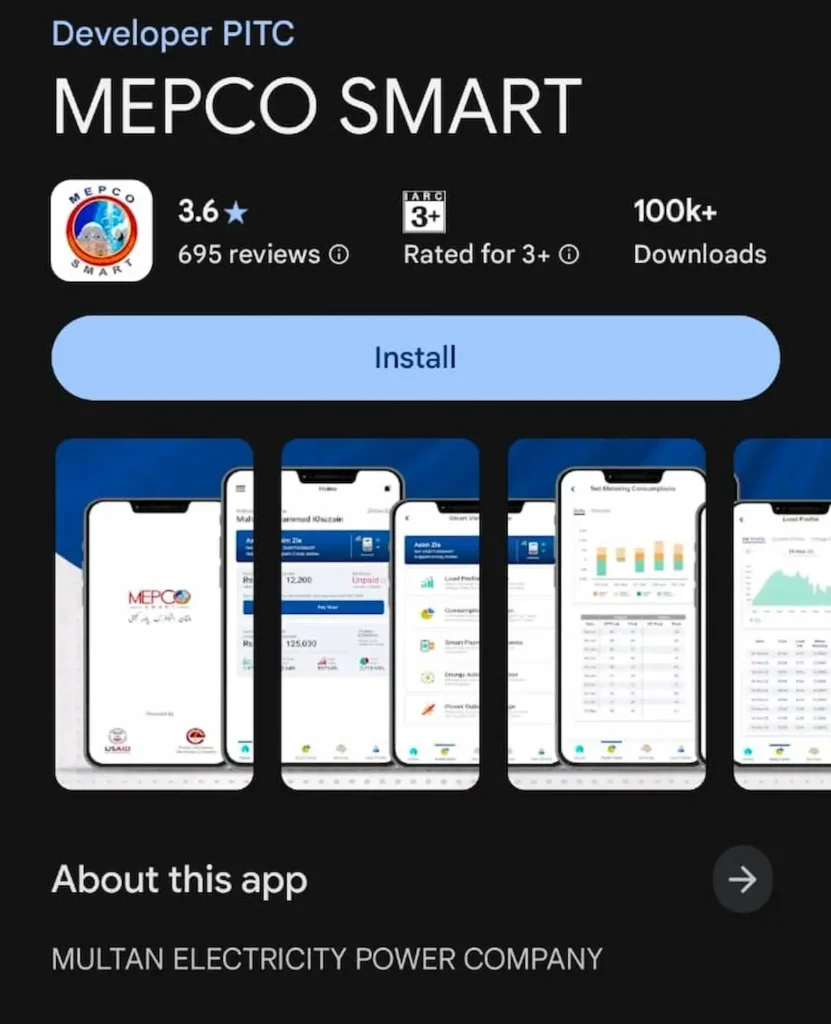
Download MEPCO Smart from Google Play Store — developed by PITC, not a third party.
- Register with your name, CNIC, phone number, and email
- Tap the + icon → enter your 10-digit consumer ID → tap “Add Meter”
- Your home screen shows your latest bill, paid/pending status, and usage history
You can add multiple meters — useful for households managing more than one connection.
Method 4 — Call MEPCO Helpline
Call 0800-63726 (toll-free, available 24/7) or dial 118. Give your CNIC and your registered property address. The agent looks up your reference number on their system and reads your bill details to you directly.
Every Charge on Your MEPCO Bill — Explained Simply
Your MEPCO bill has two types of charges — consumption-based charges (what you actually used) and fixed government levies (taxes and surcharges applied regardless of usage). Here is what each line means.
FPA — Fuel Price Adjustment
FPA is why your bill changes month to month even when your units stay the same. Each month, NEPRA calculates the difference between actual fuel costs used in power generation and the reference fuel cost set in your base tariff. When fuel prices rise, NEPRA issues a positive FPA notification — your bill increases. When they fall, your bill drops. All consumers pay FPA except lifeline consumers, and protected domestic consumers where NEPRA’s monthly decision exempts them.
GST — General Sales Tax
An 18% federal tax charged on your electricity bill under Section 3 of the Sales Tax Act 1990. The rate was raised from 17% to 18% through the Finance (Supplementary) Act 2023 and applies to most consumer categories — lifeline and protected domestic consumers are treated differently.
FC Surcharge — Financing Cost
A fixed charge of Rs. 0.43 per kWh added to recover the financing cost of loans raised to service power-sector circular debt. This rate has been revised several times since the original Rs. 0.43 per kWh was set, so check the FC Surcharge line on your own bill for the rate currently applied. Lifeline consumers are exempt.
Electricity Duty
A provincial government levy of 1% to 1.5% of your total bill. The exact rate depends on your consumer category and provincial notification.
Income Tax
Deducted at source from your bill. The rate depends on your consumer category and whether your CNIC is on FBR’s Active Taxpayer List. Filers pay a lower rate than non-filers.
TR Surcharge — Tariff Rationalization Surcharge
This charge covers the gap between the tariff NEPRA determines and the lower tariff the Government of Pakistan sets for consumers. When the government tariff is below NEPRA’s rate, this surcharge recovers the difference directly from consumers.
PTV Licence Fee
This charge no longer applies. The Government of Pakistan abolished the PTV licence fee (previously Rs. 35/month) in July 2025, following the Prime Minister’s announcement at the end of June 2025. If you see it on an older bill, it was charged before the abolition notification. Current bills should not carry this charge.
Further Tax and Extra Tax
Further Tax (3%) applies to commercial and industrial consumers not registered for Sales Tax returns. Extra Tax (5%–17%) applies to commercial and industrial consumers absent from FBR’s Active Taxpayer List. Rates vary by bill amount slab.
Deferred Amount
When MEPCO approves a payment deferral, the unpaid amount shifts to your next bill without an immediate late fee. It appears as a separate line — “Deferred Amount” — added to next month’s total.
Worked Example — July 2026 (Domestic, Non-Protected, 350 units)
| Charge | Amount (approx.) |
|---|---|
| Energy charges (350 units at applicable slab rates) | Rs. 6,200 |
| FPA (variable — based on NEPRA July 2026 notification) | Rs. 1,050 |
| FC Surcharge (350 × Rs. 0.43) | Rs. 151 |
| GST @ 18% | Rs. 1,258 |
| Electricity Duty @ 1.5% | Rs. 128 |
| Income Tax (non-filer rate) | Rs. 310 |
| TR Surcharge | Rs. 175 |
| Total Payable | ≈ Rs. 9,272 |
Figures are illustrative. Your exact amount depends on NEPRA’s confirmed July 2026 FPA notification and your registered consumer category — run your own numbers using the MEPCO bill calculator.
How to Pay Your MEPCO Bill — All Methods
Pay via Mobile Wallet or Banking App
JazzCash:
- Open JazzCash → tap “Bill Payment” → select “Electricity”
- Choose MEPCO from the provider list
- Enter your 14-digit reference number
- Confirm the amount → tap Pay → save the receipt
Easypaisa:
- Open Easypaisa → tap “Pay Bills” → select “Electricity”
- Select MEPCO → enter your reference number
- Confirm the amount → tap Pay → save the receipt
SadaPay / NayaPay:
- Open the app → go to “Bills & Utilities”
- Search for MEPCO → enter your consumer number
- Confirm and pay → save receipt for your records
HBL Mobile, Meezan Bank, UBL Digital, MCB: Any Pakistani mobile banking app with a bill payment feature follows the same process — select Utility Bills → Electricity → MEPCO → enter your reference number → confirm.
Pay at Bank Branch, ATM, or Post Office
Take your printed or downloaded duplicate bill to any HBL, UBL, MCB, Allied Bank, or Meezan Bank branch. You can also pay at ATMs — select bill payment, choose MEPCO, and enter your reference number when prompted. Pakistan Post offices in major MEPCO cities also accept electricity bill payments.
MEPCO Peak Hours — When Not to Run Heavy Appliances
MEPCO designates specific hours each day as peak demand periods. Running your AC, washing machine, iron, or water pump during these hours drives up national grid demand — which feeds directly into next month’s FPA charge.
| Months | Peak Hours |
|---|---|
| April – October | 6:30 pm – 10:30 pm |
| November – March | 6:00 pm – 10:00 pm |
On a standard meter, peak hours do not change your per-unit rate directly — but on a TOU/TOD meter, off-peak units cost less. Either way, shifting heavy appliance usage outside these windows lowers your consumption, keeps you in a lower tariff slab, and reduces the national FPA burden that affects every consumer.
MEPCO Bill Due Date Extension and Instalment Options
If you cannot pay before the due date, MEPCO offers two formal relief options: a short extension with no penalty for the extended period, or a split into 3–12 instalments. Both require visiting the relevant MEPCO officer — the officer depends on your bill amount.
Due Date Extension — Exact Thresholds
| Bill Amount | Officer | Extension |
|---|---|---|
| Up to Rs. 10,000 | Assistant Manager Operation (AMO) | 3 days |
| Rs. 10,001 – Rs. 25,000 | Deputy Manager Operation (DMO) | 3 days |
| Rs. 25,001 – Rs. 2,00,000 | Manager Operation (MO) | 5 days |
| Above Rs. 2,00,000 | Chief Executive Officer (CEO) | Case-by-case |
Instalment Plan — Split Your Bill
| Bill Amount | Officer | Instalments |
|---|---|---|
| Up to Rs. 10,000 | AMO | 3 instalments |
| Rs. 10,001 – Rs. 1,00,000 | DMO | 3 instalments |
| Rs. 1,00,001 – Rs. 5,00,000 | Manager Operation | 4 instalments |
| Above Rs. 5,00,000 | Chief Engineer | Up to 12 instalments |
Visit your nearest MEPCO subdivision office with your latest bill and CNIC. Most extensions are approved on the same visit.
Wrong MEPCO Bill? How to Register a Complaint and Get It Fixed
Register a Complaint Online via CCMS
- Go to ccms.pitc.com.pk/complaint — the official complaint portal operated by PITC for MEPCO and all other DISCOs
- Enter your 14-digit reference number and your mobile number, then confirm the OTP sent to that number — no account registration is required
- Select “Bill Correction” from the complaint categories
- Enter the correct meter reading from your physical meter and submit
Under NEPRA consumer protection regulations, MEPCO must resolve billing complaints within 7 working days. If you receive no resolution after 7 days, escalate directly to your MEPCO Circle Office in person.
MEPCO Contact Details
- 24/7 Helpline: 118
- Toll-Free (complaints + theft reporting): 0800-63726
- Head Office: Khanewal Road, Multan
- Load Shedding Schedule: ccms.pitc.com.pk/FeederDetails — enter your reference number to see your feeder’s outage timings
If MEPCO Does Not Respond Within 7 Days
File a formal complaint directly with NEPRA at nepra.org.pk (Consumer Services section). If NEPRA also fails to resolve it, the Federal Mohtasib (Ombudsman) at mohtasib.gov.pk is your final escalation — the service is free and fully accessible online. No lawyer needed.
How to Reduce Your MEPCO Bill — Practical Steps That Work
- 1. Stay below your slab threshold. Pakistan’s domestic tariff uses a slab system where crossing into a higher slab applies the higher rate to all your units — not just the extra ones. If you typically consume around 310 units, cutting back to 290 can save far more than the price of those 20 units alone, because it keeps your entire bill in the lower slab. Track your usage mid-month using the PITC portal’s consumption history.
- 2. Shift heavy appliances outside peak hours. Run your AC, washing machine, iron, and water pump before 6:30 pm or after 10:30 pm (April–October). This directly reduces your feeder’s grid load and lowers the national FPA figure that hits every consumer’s bill the following month.
- 3. Set your AC to exactly 26°C. Every degree below 26°C raises AC power consumption by roughly 8%. A 1.5-ton AC running 8 hours daily at 24°C adds 15–20 extra units monthly — often enough to cross into the next billing slab.
- 4. Replace standard ACs with inverter models. A standard 1.5-ton AC draws approximately 1.5 kWh per hour. An inverter model draws 0.8–1.0 kWh for the same cooling output. Over a four-month South Punjab summer, the unit saving pays back the price difference within 2–3 years.
- 5. Request a TOU/TOD meter from MEPCO. A Time-of-Use meter charges lower per-unit rates during off-peak hours and higher during peak hours. Households that shift most of their usage to off-peak windows consistently save 15–25% annually on their bijli bill.
- 6. Apply for solar net metering through MEPCO. MEPCO accepts net metering applications for solar panel systems. A bi-directional meter tracks both your grid imports and your solar exports — surplus units you generate credit directly against what you owe. Savings depend on the buyback rate in force, which has been revised in recent years — confirm the terms that apply to new applications with MEPCO before you invest.
FAQs
Can I check my MEPCO bill using my CNIC number?
No. The PITC portal requires either a 14-digit reference number or a 10-digit customer ID — CNIC lookup is not supported anywhere in the online system. If you have lost both numbers, call 0800-63726 with your CNIC. The helpline agent retrieves your reference number from their internal database directly.
What is a duplicate MEPCO bill and is it different from the original?
A duplicate bill is an online reprint of your original bill, generated through the PITC portal. There is no legal or functional difference between the two — same amount, same due date, same reference number. Every bank branch, Easypaisa agent, and JazzCash counter accepts it for payment without question.
How do I check my old MEPCO bill history?
When you check your current bill using the tool above, the PITC portal automatically shows your last 12 months of bills below the current one. Each entry displays the billing month, units consumed, amount charged, and payment status — paid or outstanding. No separate request or login is needed.
What is a detection bill in MEPCO?
A detection bill — also called a theft detection bill — is issued when MEPCO inspectors find evidence of electricity theft or illegal meter tampering at a premises. The amount reflects estimated unbilled consumption over the theft period, calculated using MEPCO’s standard detection formula. It appears separately from your regular monthly bill and must be paid in addition to it.
How do I know if my MEPCO bill has been paid?
Check your bill using the tool at the top of this page. The 12-month payment history section shows “Paid” or “Outstanding” against each billing month. Your JazzCash, Easypaisa, or bank app transaction history also holds the confirmation receipt with the reference number and exact payment date.
Can I pay my MEPCO bill after the due date?
Yes. The after-due-date amount — visible when you check your bill online — includes the late payment surcharge added on top of the original figure. MEPCO does not disconnect for a single missed payment immediately, but consistent non-payment leads to disconnection. Pay as soon as possible — the surcharge increases the longer you wait.
What does “Bill Not Found” mean when I check online?
It means the number you entered does not match any record in PITC’s database. The most common causes are: typing spaces between digits, confusing the 14-digit reference number with the 10-digit consumer ID printed nearby, or checking before the current month’s bill has been generated. Switch to your 10-digit customer ID and try again.
How can I get my MEPCO bill by SMS?
Type pitc 20151744038540 — replacing those digits with your own 14-digit reference number, no spaces within the number — and send it to 8334 from any Pakistani mobile. You receive the bill amount, due date, and billing month by return SMS within seconds, on any network.